Showing posts with label Project 4: D and AD. Show all posts
After the feedback that I should have another Squib in here I decided to go and get a more cultured quote. I chose to use this one "Music is about listening, the more you play, the more the magic spreads." Maynard James Keenan, I think this expresses what Spotify on Facebook aims to do. Below is the version which I submitted to D&AD
- Leave your comment • Category: Project 4: D and AD
- Share on Twitter, Facebook, Delicious, Digg, Reddit

you can find the final submission video here. My tutor watched this and suggested that I have a squib playing right at beginning so I will make these changes before the D&AD submission there are also a few bugs in the video which I didn't get change to change.
- Leave your comment • Category: Project 4: D and AD
- Share on Twitter, Facebook, Delicious, Digg, Reddit
For the backing music to my video Simon linked me to a site he had found which had links to royalty free music. (http://www.weave-creative.co.uk/general/royalty-free-music-for-showreels/) after looking around I managed to find a neutral song which was not overpowering.
- Leave your comment • Category: Project 4: D and AD
- Share on Twitter, Facebook, Delicious, Digg, Reddit
I wrote the script and storyborded by homepage video then started building it. But I was not happy with how it was looking for decided to shelf it for a few days until I had a clear vision in my mind of how it would fit into the final video. however when I came to writing the script for my final video I found that it was going to take me around 2 mins to demo the product and thats the time limit that my video has so I've decided to drop the homepage animation from my submission. you can see my initial steps here
- Leave your comment • Category: Project 4: D and AD
- Share on Twitter, Facebook, Delicious, Digg, Reddit
I've posted a load of step by step designs of my pages so far and I've not done the designs for my 2nd and 3rd pages however I had a much clearer picture in my head when I approached these pages so it didn't develop that much from my initial sketches as I created them. I'm just going to point out a few key features and show the designs.
Page 2
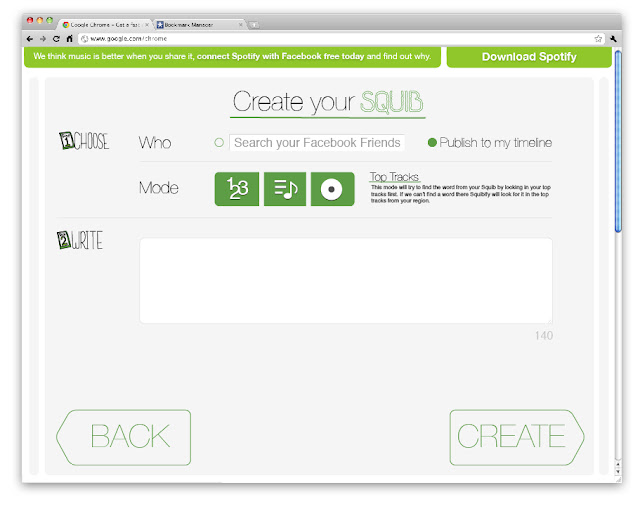
This is the section where you create your squib. I tried to keep it clean and clear by splitting it into clear steps. For the icons I adapted ones currently used within Spotify in order to tie the design in with the brand. the content box and buttons have the rounded corners which Spotify uses on there websites. The squib entry box also has the familiar corner extension design to show that you can increase the size of the box. there is a character count down as well to show how many characters you have remaining.
Page 3

I've just got a placeholder image in for the youtube video at the moment. The enjoy text will only appear once the user has clicked share. This is to enable the site to have a call to action after engaging with its main function. I chose to link back to the friend activity section I had seen on the Spotify Facebook page as that is a nice place to see how your friends are also engaging with the app.
- Leave your comment • Category: Project 4: D and AD
- Share on Twitter, Facebook, Delicious, Digg, Reddit
Here I have adapted the home page to display on a Facebook tab. I also created a little icon for the app. On the Facebook page I have chosen to no display the video and just have it go straight to begin as users will only access the app through the Facebook page once they have already created a squib.

- Leave your comment • Category: Project 4: D and AD
- Share on Twitter, Facebook, Delicious, Digg, Reddit
Having looked at some more inspiration and gotten feedback on my home page I decided to do a slight re-design of my home page. Below is my design process; 


All the type was hand drawn by me and I would quite like to turn it into a full font to publish for free if I can find time
- Leave your comment • Category: Project 4: D and AD
- Share on Twitter, Facebook, Delicious, Digg, Reddit
For the text of my squib I wanted to have a popular or funny tweet but when I looked in a few places, such as top tweets and funny status I could not find anything suitable. Instead I decided to take insperation from the videos I've watched which talk about the situation you would be in when you use the app. So I'm going to make a squib that someone would send if they where actually using Squibify.
After trying to think something up I came across this status update which I think would be great,
Do you realize that in about 40 years, we’ll have thousands of old ladies running around with tattoos?
in order to make it work I changed it to the following:
In 40 years, you'll be a little old lady running around with tattoos
To make the squib I used Lyricfinder and seatched for the words I needed.
Here are the song I took the words from.
- alicia keys fallin 0:14
- the phoenix foundation 40 years 1:33
- neild dimond girl, you'll be a woman soon 0:03
- beach boys little old lady 0:12
- superstars & madvilli running around with another 1:13
- warren tattoos and cigaretts 0:14
Here is what it sounds like when I stitch them all together.
My coursemate Simon suggested that I use a more cultured quote which I think is a good idea and if I have time to make another I will hunt brainyquotes like he suggested.
- Leave your comment • Category: Project 4: D and AD
- Share on Twitter, Facebook, Delicious, Digg, Reddit
I got some feedback that my character was needed some work, in the teeth and hat! so I decided to go and look for some more inspiration.
One key place is a blog I follow called Ten Paces and Draw where they post some great examples of illustration.
I also looked at some other app sites for inspiration. Go Live! really inspired my design they use a really minimal design so you can go straight into using the app.

I also noticed Spotify currently has an character illustration style which is visible in these two videos.
I've decided that I am going to completely ditch my character and instead use the Spotify style. Also these have rounded corners like I had already decided to have on my home page video
- Leave your comment • Category: Project 4: D and AD
- Share on Twitter, Facebook, Delicious, Digg, Reddit

- Leave your comment • Category: Project 4: D and AD
- Share on Twitter, Facebook, Delicious, Digg, Reddit
For the video on my home page I have been looking for some inspiration at other online app and sites which have a welcome video.
There are some nice examples of these two pages. One of the key things with animation is that you can do interesting transitions which explain the story.
http://www.spotify.com/uk/about/what/
http://wufoo.com/
This animation explains creative commons
I really like the motion graphics in this piece and I find it very inspiring, I would like to try and capture lots of little details in my animation.
- Leave your comment • Category: Project 4: D and AD
- Share on Twitter, Facebook, Delicious, Digg, Reddit
After getting feedback from my class and tutors and doing some sketches I decided that my idea for the logo was too complicated so I have chosen to go with a static design which encorporates part of the existing Spotify logo and colours. I built this in Illustrator by hand starting from sketches I had done in my sketch book. Here are the steps I took to design it.


- Leave your comment • Category: Project 4: D and AD
- Share on Twitter, Facebook, Delicious, Digg, Reddit
Here are the step by step workings of my homepage design process working from my latest wire frames I had drawn up in my sketch book, I did my designing in illustrator as I knew that I would be tweeking sizes and colors often.


In the top left there is space for my logo and in the bottom right there is space for my begin button, which I have not yet designed.
I chose to switch the Spotify bar from the bottom to the top due to varying screen size. I did not want to have to scroll up from behind it as I felt that would feel odd. instead I think its better having it fixed to the top of the screen which content can scroll up to hide behind it.
- Leave your comment • Category: Project 4: D and AD
- Share on Twitter, Facebook, Delicious, Digg, Reddit
I have been looking for inspiration on ways of presenting my ideas and I have found a few good examples from companys launching new web app or explaining them to new customers. I think this is the correct approach to take as I have to communicate the concept, everything it can do, and how it works to the judges for them to fully understand the idea.
This is a video for Google+: Sparks
This video uses a voiceover about the situation and the emotions around why you would use the product alongside close up footage of someone using the interface. The interesting angles and the close up shots add a feeling of mystery which makes you focus on the voiceover for an explanation and when you don't get a direct one it gives you a connection to the emotion.
I really like the interesting angles but you do not get a sense of the interface as a whole which I think is important so that people have reference points when you do have a closer shot.
Mailchimp have a video on there homepage which explains the key features of the web app
Like the Google video it starts of talking about the situation in which you might use the app it then goes into specific features which the app offers. This video shows live footage of a person in their target audience using the app showing objects from their life away from the computer as well. This video also uses close up shots of key areas of the interface I believe that this is because they are giving a brief overview of a app which allows you to do a large amount of things.
I really like having footage of someone using the app however I'm not sure if I will have time to be able to go out and film the shots that I would need.
This video by freckle shows the app in more detail than the other two videos
http://letsfreckle.com/tour/
without a voice over this video gets quite boring though. You do however get a real sense of how it works and how you can use the it.
this is another video walk through by SnapPages
http://www.snappages.com/tour
This again has no voice over so gets a little boring especially as its 4 mins long. This video dose do a good job of showing the UI and how it gets used. It really gives you a sense of the time requirements that would be needed, I think this is a really important feature as the time people spend doing tasks is shrinking so it needs to be quick.
- Leave your comment • Category: Project 4: D and AD
- Share on Twitter, Facebook, Delicious, Digg, Reddit
I just discovered that the Spotify identity manual is online. This will be really useful for making my design look as if it is an official Spotify product.
http://spotify.com/wp-content/uploads/spotify-identity-manual.pdf
- Leave your comment • Category: Project 4: D and AD
- Share on Twitter, Facebook, Delicious, Digg, Reddit
The copy which my site has will be a key way in which to communicate the message. I'm going to use this post to play around with some ideas.
ver1
h2:
Cut, mash, and splice your Spotify into musical messages
disc:
Facebook and Spotify’s little love child. Squibify lets you quickly create video messages from your top tracks to share with your Facebook friends. With millions of tracks on Spotify you'll never to short of inspiration.
ver2
h2:
Cut, mash, and splice your Spotify into musical messages
disc:
Say hello to Facebook and Spotify’s little love child. Squibify lets you quickly create video messages from your top tracks to share with your Facebook friends. With millions of tracks on Spotify you'll never be short of inspiration.
I'm quite happy with version 2 so I'll wait until I get some feedback before I take it any further
- Leave your comment • Category: Project 4: D and AD
- Share on Twitter, Facebook, Delicious, Digg, Reddit
For my logo I started off by doing some sketches in my sketchbook then once I had an idea I drew it up in Illustration and started playing around with it. Below you can see the steps my design took.


Originally I was thinking about having each of the letters in a different style to show how the app brings together different songs but I decided this might be too cheesy. However while I messing around with this logo I realised that an idea I have had in my head about the video output of these videos would be perfect for having different letters.
The idea was that each of my words in the final video will be displayed in a different font based on their genre. Applying this to the logo I will have it randomise each of the letters to 1 of several different fonts so that each time you see it its slightly different. I really like this for project as it will be delivered online so its possible to have a moving logo and it communicates the process really well. however as its going to be on Facebook as well I'm going to have to pick either 1 or several fixed states to use where it has to be static.
- Leave your comment • Category: Project 4: D and AD
- Share on Twitter, Facebook, Delicious, Digg, Reddit
Now that I'm onto designing I've been putting more thought into how the brand presents its self. I've kept the tone stated in the brief in mind all the way through, their key words where; Sociable, Uncomplicated, Optimistic, Generous, Personal, Friendly.
I wrote out a massive list of names, key words and themes. I then shortlisted these into the following names; Vocalizer, Lyric-o-matic, Mashical Messager, Squibs, Mash-a-gram
After talking through these ideas with Simon I decided to turn Squibs into Squibify and have a tag line such as "Facebook & Spotify's little love child".
Squib is a real word! It means a short piece of witty writing (a bit like a written quip). This definition is perfect for my predicted use of the app and its tone of voice.
- Leave your comment • Category: Project 4: D and AD
- Share on Twitter, Facebook, Delicious, Digg, Reddit
The concept of cutting words up and re-positioning them is not a new one and I have found a few examples of are a few places where the idea already exists.
Ricky Gervais radio show used to have a feature called Songs of Phrase, in which Karl Pilkington would re create a funny phrase from the previous weeks show using lyrics from songs. The sound of these 'Songs of Phrase' are very similar to how I imagine my videos to sound. Here is a clip of what they sounded like
This adaption of the song 99 Problems re creates the track using audio clips from films
this is partly how I picture the video to look if I have cut up parts of the music video alongside the words in the final video.
- Leave your comment • Category: Project 4: D and AD
- Share on Twitter, Facebook, Delicious, Digg, Reddit
I have finished up the wireframes for the other pages in my sketch book so now I'm going to start creating the visuals. I have already decided that the design will contain a lot of empty space which can be used for custom background for sessional events and competitions. I am going to look at Spotifys home page and interface so I can see if there are common design elements which I can use align the campaigns design.

At first glance this is a very simple site with the dark grey standing out on a light background and spotify green colour popping out of the page. One key feature is that all the boxes have rounded edges creating a fun soft feeling. The buttons all have a 3d effect which adds to the rounded edges. The site keep subtle details with a textured background around the lower boxes so that they stand out more. There is also more detail in the use of a rough sketched style font which is used a header text thought the site.
The hand drawn text could be a potential inspiration for the design of the site. I could sketch and draw the elements which would fit with the mashed together feeling of the end product.

The Spotify interface is really dark it uses light tones to bring out key details, as well as shadows to make them pop. It uses a column layout. The list items are inset from their titles. It uses its logo in the sound section. It dose not use its full logo in the program. Unselected details are inset into the interface.
- Leave your comment • Category: Project 4: D and AD
- Share on Twitter, Facebook, Delicious, Digg, Reddit